
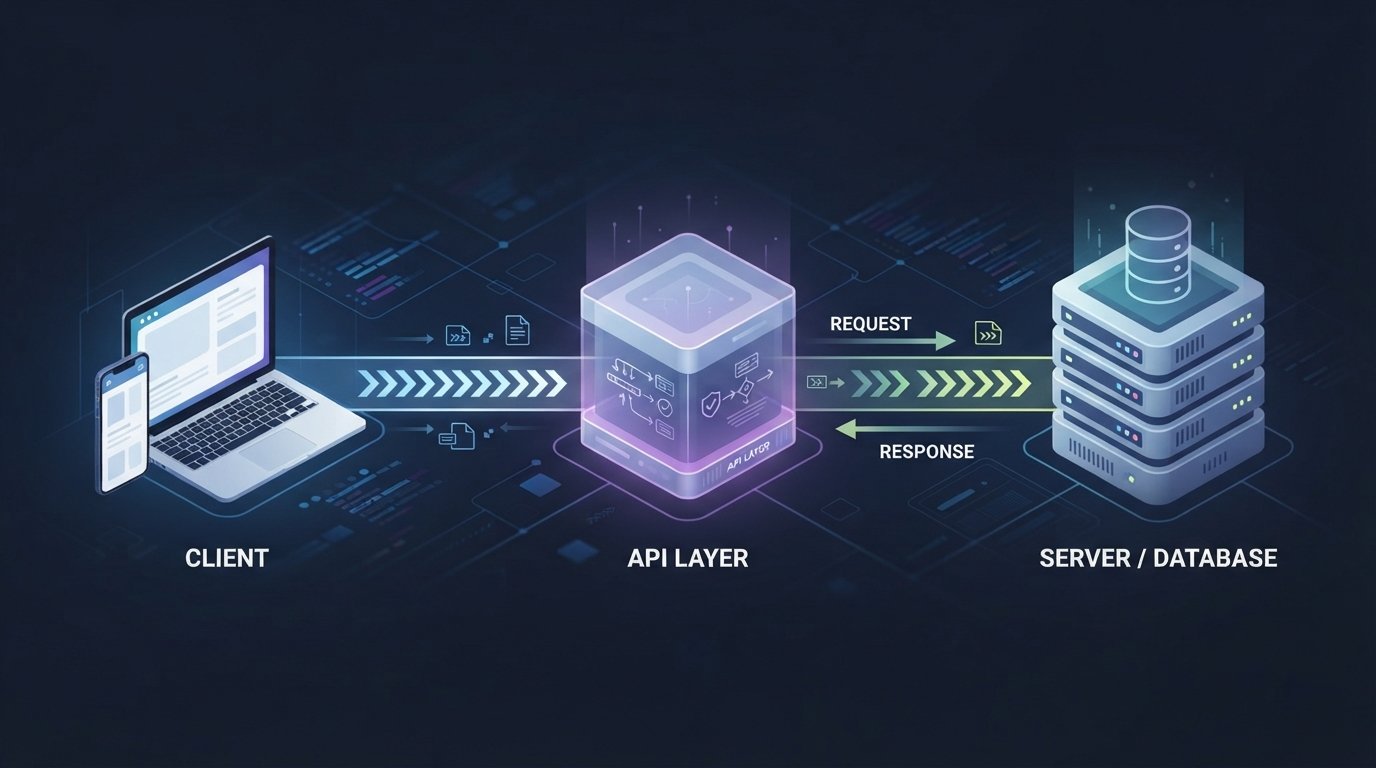
What Is an API? How APIs Work With Simple Examples
Modern websites and applications rarely work completely on their own.
A weather application needs weather information from somewhere. A shopping website may need a payment service to process transactions. A mobile application might need to communicate with a company’s server to retrieve user information.
These different systems often communicate through something called an API.
APIs are an important part of modern software development, but you do not need to be a professional developer to understand the basic idea.
In simple terms, an API provides a structured way for one software system to communicate with another.
In this guide, we will explain what an API is, how APIs work, common API types, HTTP methods, API requests and responses, authentication, real-world examples, security considerations, and why APIs are important for modern applications.
What Is an API?
API stands for Application Programming Interface.
An API is a set of rules and methods that allows different software applications or systems to communicate with each other.
Instead of requiring one application to understand the internal code of another application, an API provides a defined way to request information or perform an action.
For example, imagine a weather application.
The weather app may not collect weather measurements itself. Instead, it can send a request to a weather API.
The process might look like this:
Weather App → Weather API → Weather Data → Weather App
The application asks for specific information, and the API provides a response in an expected format.
A Simple Real-World Example of an API
Think about ordering food at a restaurant.
You sit at your table and tell the waiter what you want. The waiter takes your request to the kitchen and eventually brings your order back.
In this example:
- You are the client.
- Waiter represents the API.
- Kitchen represents the server or underlying system.
- Food represents the requested data or result.
You do not need to know how the kitchen prepares the food. You simply make a request through the available interface.
An API works in a similar way.
The client sends a properly formatted request, and the server processes it and returns a response.
How Does an API Work?
A typical API interaction involves several steps.
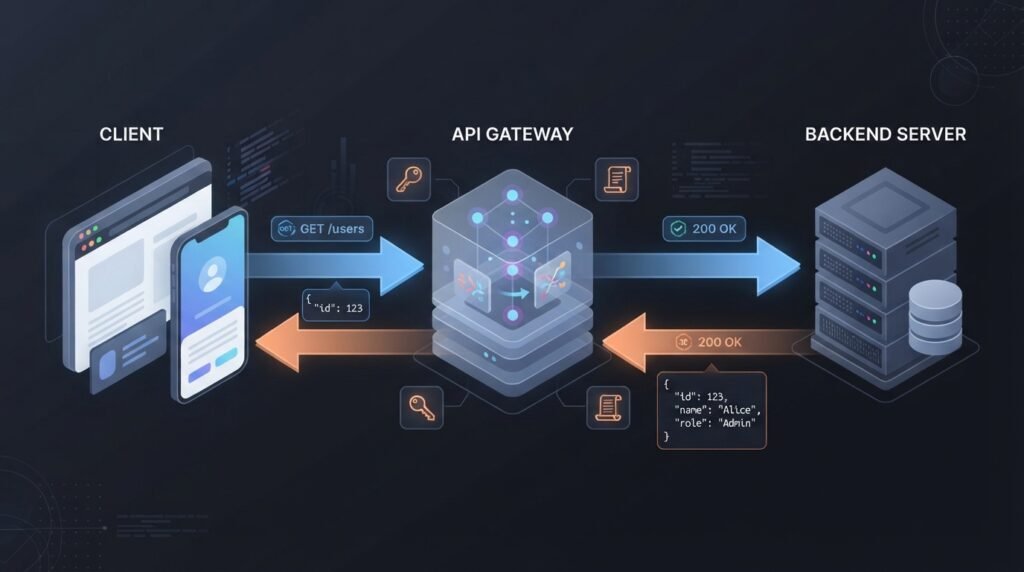
Step 1: The Client Sends a Request
The client is the application or system making the request.
For example, a mobile application may request information about a user’s profile.
Step 2: The API Receives the Request
The API receives the request and determines what the client is asking for.
The request may contain information such as:
- The requested endpoint
- HTTP method
- Parameters
- Authentication information
- Request data
Step 3: The Server Processes the Request
The server handles the request.
It may retrieve information from a database, perform calculations, communicate with another service, or carry out another operation.
Step 4: The API Returns a Response
The server sends a response back to the client.
The response can contain:
- Requested data
- A success message
- An error
- A status code
- Other relevant information
A simplified process looks like this:
Client → API Request → Server → API Response → Client
What Is an API Endpoint?
An API endpoint is a specific location where a client can access a particular API resource or operation.
For a web API, an endpoint is often represented by a URL.
For example:
An API may have multiple endpoints.
| Endpoint | Possible Purpose |
| /api/users | Work with user information |
| /api/products | Retrieve product information |
| /api/orders | Manage orders |
| /api/articles | Retrieve articles |
The actual endpoints depend entirely on the API being used.
What Is an API Request?
An API request is a message sent by a client to an API.
For web APIs, the request often uses HTTP.
A request can include several components.
HTTP Method
The HTTP method indicates what type of operation the client wants to perform.
Common methods include:
- GET
- POST
- PUT
- PATCH
- DELETE
URL or Endpoint
The endpoint identifies the API resource or operation being requested.
Headers
Headers can provide additional information about the request.
They may contain information related to:
- Authentication
- Content type
- Client preferences
- Caching
- Other request metadata
Parameters
Parameters allow the client to provide additional information.
For example, an API might allow a client to request products belonging to a particular category.
Request Body
Some requests include data in the request body.
This is common when creating or updating resources.
For example, a client might send user information when creating a new account.
Common HTTP Methods Used by APIs
HTTP methods are commonly used to describe the intended action.
| Method | Common Purpose |
| GET | Retrieve information |
| POST | Create or submit information |
| PUT | Replace or update a resource |
| PATCH | Partially update a resource |
| DELETE | Delete a resource |
The exact behavior depends on how the API is designed.

GET
GET requests are commonly used to retrieve data.
For example:
GET /api/products
The server may return a list of products.
POST
POST requests are commonly used to submit data or create a new resource.
For example:
POST /api/products
The request body could contain information about a new product.
PUT
PUT can be used to replace or update an existing resource.
For example:
PUT /api/products/25
The number may identify a particular product.
PATCH
PATCH is commonly used when only part of a resource needs to be updated.
For example, changing only a product’s price without replacing all of its information.
DELETE
DELETE is commonly used to remove a resource.
For example:
DELETE /api/products/25
This could request deletion of product 25 if the API allows the operation.
What Is an API Response?
After processing a request, an API usually sends a response.
The response tells the client whether the operation succeeded and may include requested information.
A response can contain:
- HTTP status code
- Headers
- Data
- Error information
HTTP Status Codes
HTTP status codes help describe the result of a request.
| Status Code | General Meaning |
| 200 | Request successful |
| 201 | Resource created |
| 204 | Request successful with no response content |
| 400 | Bad request |
| 401 | Authentication required or invalid |
| 403 | Access forbidden |
| 404 | Resource not found |
| 429 | Too many requests |
| 500 | Server-side error |
These codes help developers understand what happened during an API request.
What Is JSON in an API?
Many modern web APIs use JSON to exchange data.
JSON stands for JavaScript Object Notation.
It provides a structured way to represent information.
For example:
{
“name”: “Alex”,
“age”: 25,
“country”: “Pakistan”
}
This structure is easy for applications to process and relatively easy for humans to read.
An API could return information in JSON such as:
{
“id”: 101,
“name”: “Laptop”,
“price”: 850
}
The client application can then use this information to display the product.
API Authentication
Some APIs are publicly accessible, while others require authentication.
Authentication allows an API to determine who or what is making a request.
Common authentication approaches include:
- API keys
- Tokens
- OAuth
- Username and password in specific systems
- Other authentication mechanisms
API Keys
An API key is a value provided to identify or authorize API requests.
A developer may receive an API key after registering for a service.
API keys should generally be treated as sensitive credentials and should not be exposed publicly when the provider expects them to remain private.
Tokens
Tokens can also be used to authenticate requests.
Depending on the system, a token may represent an authenticated session or authorization to access certain resources.
OAuth
OAuth is a framework commonly used to allow applications to access resources on behalf of a user without requiring the application to directly handle the user’s password for the third-party service.
It is widely used for authorization between applications and services.
What Are API Rate Limits?
API providers may limit how many requests a client can make within a particular period.
This is called a rate limit.
For example, an API might allow a certain number of requests per minute or per day.
Rate limits can help:
- Protect server resources
- Prevent abuse
- Reduce excessive traffic
- Maintain service reliability
- Provide fair access to users
If a client sends too many requests, the API may return a 429 Too Many Requests response.
Developers should follow the API provider’s documented limits.
Types of APIs
APIs can be categorized in different ways.
REST APIs
REST, or Representational State Transfer, is a widely used architectural style for web APIs.
REST APIs commonly use HTTP methods and resources.
For example:
GET /users
GET /users/25
POST /users
DELETE /users/25
REST APIs often return JSON, although other formats are possible.
GraphQL APIs
GraphQL is a query language and API architecture that allows clients to request specific data.
Instead of receiving a predefined response containing many fields, a client can request the fields it needs.
This can be useful for applications with complex or flexible data requirements.
SOAP APIs
SOAP, or Simple Object Access Protocol, is a messaging protocol used for exchanging structured information between systems.
SOAP is often associated with enterprise and legacy systems and can provide formal standards for communication and security.
Web APIs
The term Web API generally refers to an API that can be accessed over web technologies such as HTTP.
Many modern applications use web APIs to communicate between browsers, servers, mobile applications, and third-party services.
Public vs Private APIs
APIs can also be categorized according to who can use them.
| Type | Description |
| Public API | Available for external developers, usually under specific conditions |
| Private API | Intended for use within an organization or system |
| Partner API | Shared with selected external partners |
A company may use private APIs to connect its own internal services while offering selected public APIs to developers.
Real-World Uses of APIs
APIs are used across almost every area of modern technology.
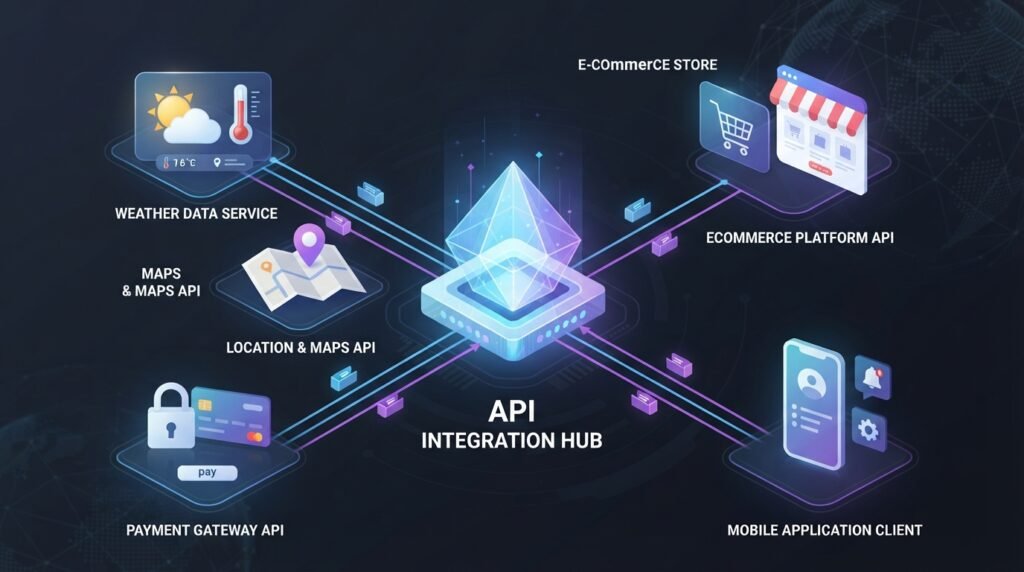
Payment Systems
Online stores can use payment APIs to communicate with payment providers.
The website can send transaction information to the payment service and receive a result.
Weather Applications
A weather application can request current or forecast information from a weather API.
The app does not need to maintain its own weather measurement infrastructure.
Maps
Websites and mobile applications can integrate mapping services through APIs.
This can allow applications to display maps, search locations, calculate routes, or perform other location-related tasks depending on the service.
Social Media
Applications can sometimes use APIs to interact with social platforms where the platform provides supported API functionality.
This can include retrieving permitted information or performing approved actions.
E-Commerce
Online stores can use APIs for:
- Product information
- Payments
- Shipping
- Inventory
- Customer accounts
- Order management
This allows different services to work together without being built as one large system.
Why Are APIs Important?
APIs make it easier for different software systems to communicate.
Without APIs, developers would often need to create custom integrations for every system from scratch.
APIs provide standardized interfaces that can make software development more efficient.
Reusability
An API can expose functionality that multiple applications can use.
For example, a company could have one customer API used by its website, mobile application, and internal tools.
Integration
APIs allow different services to work together.
A website can communicate with payment, email, analytics, mapping, storage, or other services through APIs.
Faster Development
Developers do not always need to build every feature themselves.
They can use existing APIs to add supported functionality to an application.
Scalability
Well-designed APIs can help organizations separate different parts of their systems.
This can make it easier to develop, maintain, and scale complex applications.
API Security
APIs can provide powerful functionality, but poorly secured APIs can create serious security risks.
Developers should consider:
- Strong authentication
- Authorization controls
- Input validation
- HTTPS
- Rate limiting
- Secure credential management
- Logging and monitoring
- Proper error handling
- Regular security testing
Authentication vs Authorization
These two concepts are related but different.
Authentication asks:
Who are you?
Authorization asks:
What are you allowed to do?
For example, a user may successfully log into an application but still not have permission to delete another user’s account.
Both authentication and authorization need to be implemented correctly.
How Developers Test APIs
Developers can test APIs using various tools.
A simple API testing process may include:
- Identify the endpoint.
- Select the appropriate HTTP method.
- Add required parameters.
- Provide authentication if necessary.
- Send the request.
- Review the response.
- Check status codes and returned data.
- Test error conditions.
API testing helps developers confirm that an API behaves as expected.
API Documentation
Good API documentation is extremely important.
Documentation should explain how developers can use the API.
Useful documentation commonly includes:
- Available endpoints
- HTTP methods
- Required parameters
- Authentication requirements
- Request examples
- Response examples
- Error codes
- Rate limits
- Usage restrictions
Clear documentation reduces confusion and makes integration easier.
API vs Website
An API and a website are not the same thing.
| Website | API |
| Designed primarily for human users | Designed primarily for software |
| Usually provides a visual interface | Usually provides structured data or operations |
| Users interact through browsers | Applications interact through requests |
| HTML/CSS/JavaScript commonly used | HTTP and structured data commonly used |
A website may use an API behind the scenes to retrieve information.
For example, a product page could request product information from an internal API and then display it to the visitor.
Do Beginners Need to Learn APIs?
If you want to become a web developer, mobile developer, software engineer, or backend developer, understanding APIs is highly valuable.
You do not need to master advanced API architecture immediately.
Start by learning:
- What an API is
- How requests and responses work
- HTTP methods
- Status codes
- JSON
- Authentication
- API endpoints
- Basic API testing
Once these concepts are clear, more advanced API topics become easier to understand.
Frequently Asked Questions (FAQs)
What does API stand for?
API stands for Application Programming Interface.
What is an API in simple words?
An API is a structured way for different software applications or systems to communicate and exchange information.
Why are APIs used?
APIs allow applications to communicate with other applications and services without needing direct access to their internal implementation.
What is an API endpoint?
An API endpoint is a specific location or interface through which a client can request data or perform an operation.
What is REST API?
A REST API is a web API designed around REST principles and commonly uses HTTP methods such as GET, POST, PUT, PATCH, and DELETE.
What is JSON used for in APIs?
JSON is commonly used to represent and exchange structured data between a client and an API.
Are all APIs free?
No. Some APIs are free, some offer limited free usage, and others require payment or a subscription.
What is an API key?
An API key is a credential or identifier used by some APIs to identify or authorize requests.
What is an API rate limit?
An API rate limit controls how many requests a client can make during a specific period.
Is API security important?
Yes. APIs can provide access to sensitive information and important operations, so authentication, authorization, validation, encryption, monitoring, and other security measures are important.
Can a website use an API?
Yes. Websites frequently use APIs to retrieve information, process payments, communicate with databases or services, and provide dynamic functionality.
Conclusion
APIs are one of the fundamental building blocks of modern software.
They allow different applications, services, and systems to communicate through defined interfaces. From payment processing and maps to weather applications and e-commerce platforms, APIs are used in many of the digital services people interact with every day.
Understanding basic concepts such as API endpoints, requests, responses, HTTP methods, JSON, authentication, authorization, and rate limits gives beginners a strong foundation for modern web development.
If you are learning web development, APIs should be one of the technologies you become comfortable with. Start with simple GET requests and JSON responses, then gradually learn authentication, error handling, API security, and more advanced API architectures.