
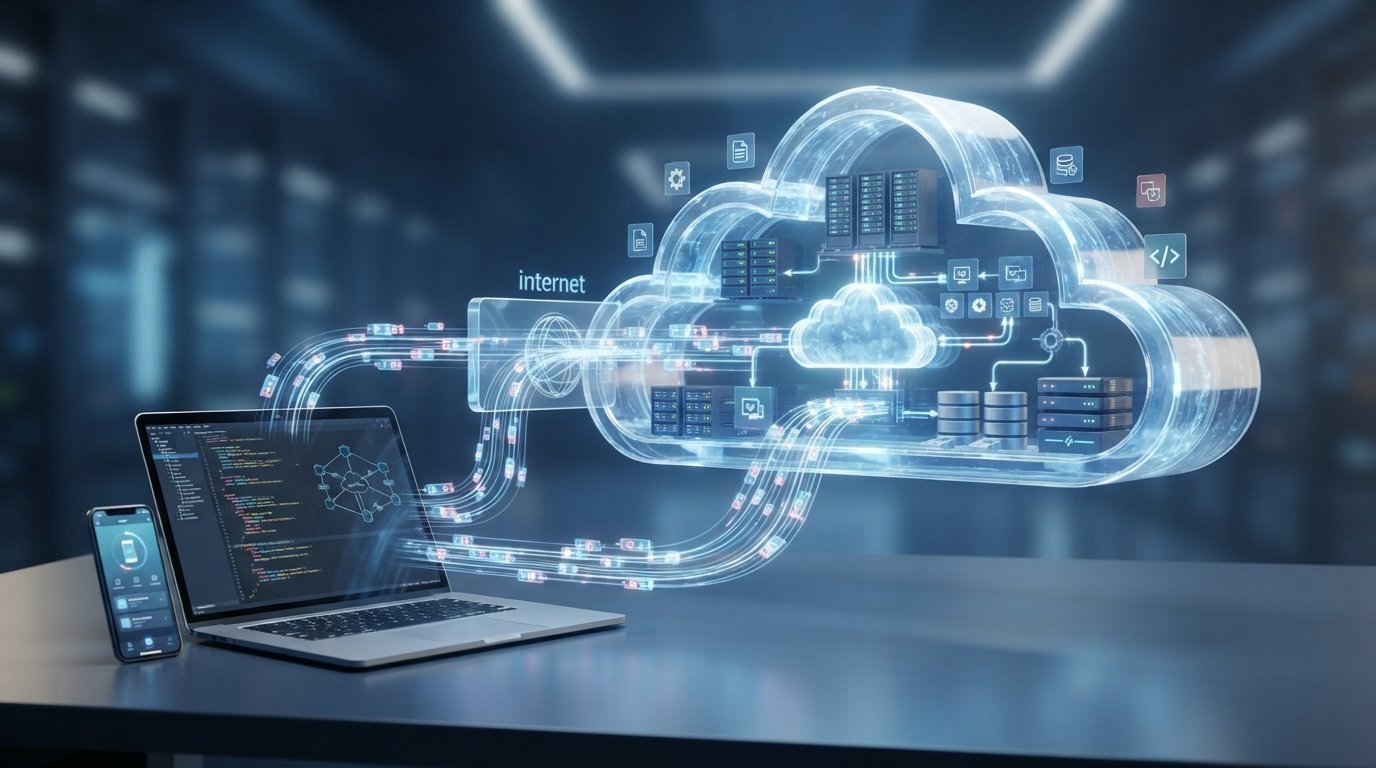
What Is Cloud Computing? Types, Benefits, and How It Works
Cloud computing has changed the way people and businesses use technology. Instead of keeping every application, file, or computing resource on a personal computer or a physical server, users can access many services through the internet.
You may already use cloud computing without thinking about it. Online storage, web-based email, video streaming, online office applications, and many smartphone services rely on cloud infrastructure.
But what exactly is cloud computing? How does it work, and why has it become so important?
In this guide, we will explain what cloud computing is, how it works, its main types, service models, benefits, limitations, security considerations, and common real-world examples.
What Is Cloud Computing?
Cloud computing is the delivery of computing resources and services over a network, usually the internet, instead of requiring users to own and manage all of the underlying physical infrastructure themselves.
These resources can include:
- Servers
- Storage
- Databases
- Networking
- Software
- Computing power
- Development tools
- Analytics services
- Artificial intelligence services
For example, when you store a file in an online storage service and access it from your phone, laptop, or another device, the file may be stored on remote infrastructure rather than only on your local computer.
The important idea is that computing resources can be accessed when they are needed without requiring the user to maintain all of the physical equipment.
How Does Cloud Computing Work?
Cloud computing depends on large collections of physical servers, storage systems, networking equipment, and software.
These systems are operated in specialized facilities known as data centers.
When you use a cloud service, your device connects to the provider’s infrastructure through the internet or another network.
A simplified process looks like this:
Your Device → Internet → Cloud Infrastructure → Service or Data
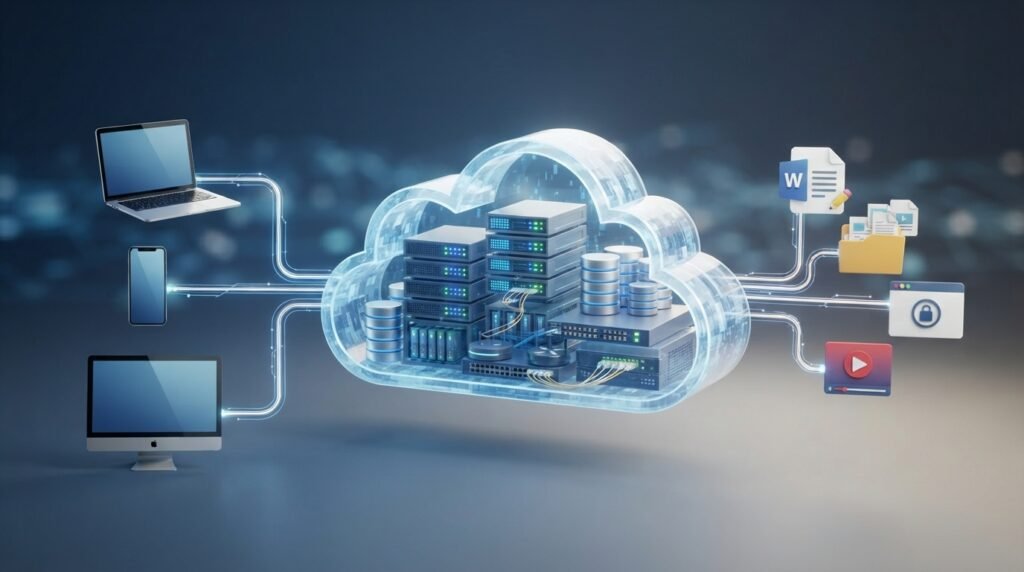
For example, when you open a cloud-based application, your computer may send requests to remote servers. Those servers process the requests and return the required information to your device.
Cloud Data Centers
A cloud provider operates data centers containing physical computing equipment.
These facilities typically include:
- Servers
- Storage systems
- Networking equipment
- Power systems
- Cooling systems
- Physical security
- Monitoring infrastructure
Cloud platforms combine these resources with software that allows them to be allocated to different customers and applications.
Virtualization
Virtualization is one of the technologies that helped make modern cloud computing practical.
A physical server can be divided into multiple virtual environments, allowing different workloads to share the same underlying hardware.
This helps providers use computing resources more efficiently and allocate resources according to demand.
Not every cloud service relies on virtualization in exactly the same way, but virtualization remains an important technology in many cloud environments.
Main Types of Cloud Computing
Cloud computing can be classified in several ways. One common classification is based on how the infrastructure is deployed.
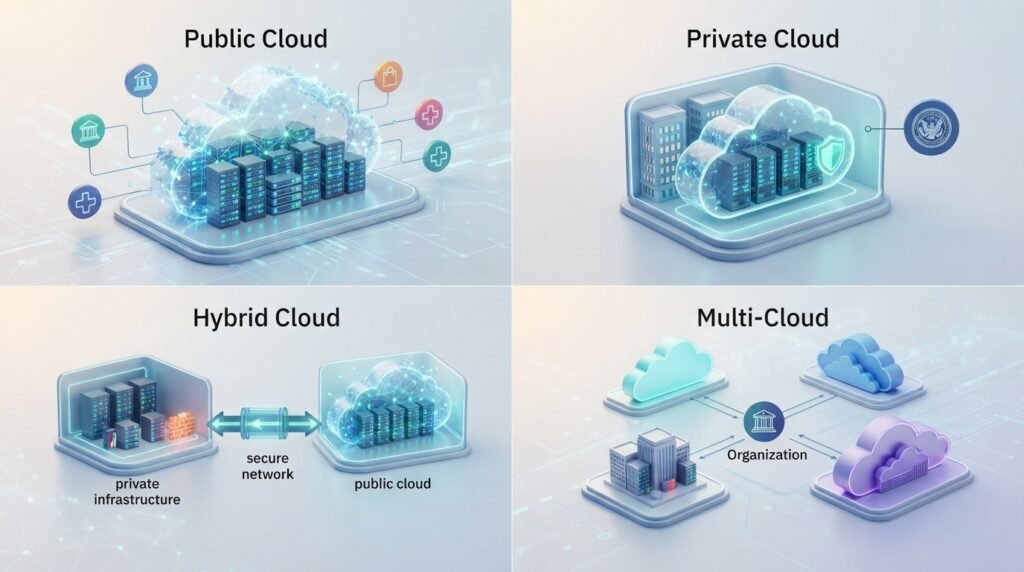
| Type | Description | Typical Use |
| Public Cloud | Infrastructure and services are provided by a third-party provider | Websites, apps, business systems |
| Private Cloud | Cloud infrastructure is dedicated to one organization | Organizations with specific control requirements |
| Hybrid Cloud | Combines private and public cloud environments | Workloads requiring flexibility |
| Multi-Cloud | Uses services from multiple cloud providers | Avoiding dependence on one provider |
Public Cloud
A public cloud is operated by a third-party provider that makes computing resources available to multiple customers.
Customers generally pay for the resources or services they use rather than purchasing and maintaining the entire physical infrastructure themselves.
Public cloud services are widely used for websites, applications, storage, databases, development environments, and many other workloads.
Private Cloud
A private cloud is designed for use by a single organization.
The organization may operate the infrastructure itself or use a third party to manage it.
Private cloud environments can provide greater control over infrastructure and configuration, but they can also require more management and investment.
Hybrid Cloud
A hybrid cloud combines private and public cloud environments.
For example, an organization might keep certain workloads in a private environment while using public cloud resources for applications that need additional capacity.
Hybrid approaches can provide flexibility, although managing multiple environments can add complexity.
Multi-Cloud
A multi-cloud strategy involves using cloud services from more than one provider.
An organization might choose different providers for different services based on factors such as pricing, technical capabilities, geographic availability, or existing infrastructure.
However, using multiple providers can also make management, security, monitoring, and cost control more complicated.
Cloud Computing Service Models
Another important way to understand cloud computing is through its service models.
The three commonly discussed models are:
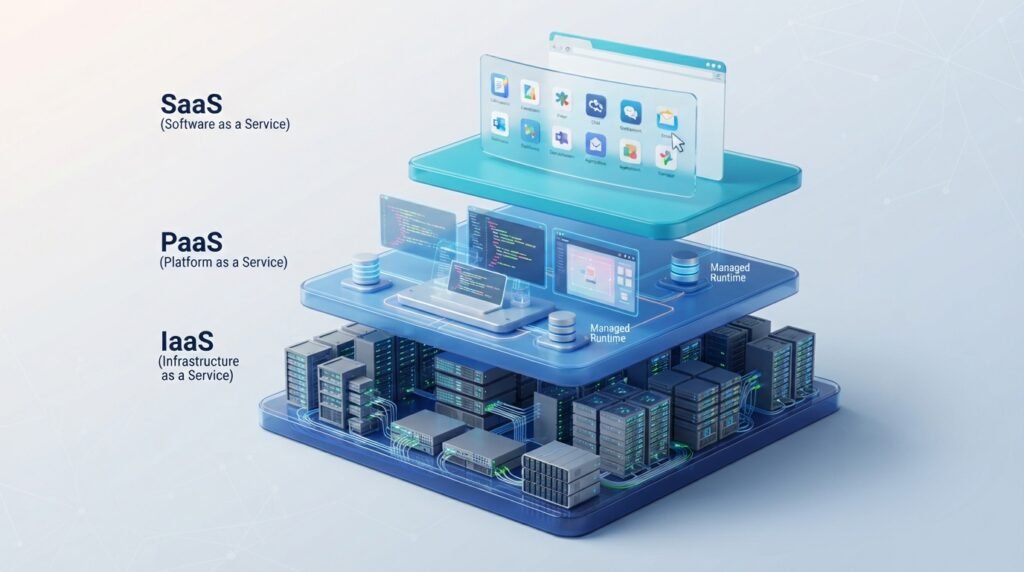
- Infrastructure as a Service (IaaS)
- Platform as a Service (PaaS)
- Software as a Service (SaaS)
| Service Model | What You Get | Example Use |
| IaaS | Virtualized infrastructure such as servers, storage, and networking | Hosting applications |
| PaaS | A managed platform for developing and running applications | Application development |
| SaaS | Ready-to-use software accessed through the internet | Email and office applications |
Infrastructure as a Service
Infrastructure as a Service (IaaS) provides basic computing resources through the cloud.
Depending on the provider, these resources may include:
- Virtual machines
- Storage
- Networking
- Firewalls
- Load balancing
- Computing capacity
IaaS gives customers significant control over their operating systems and applications while reducing the need to purchase physical servers.
Platform as a Service
Platform as a Service (PaaS) provides a managed environment for building and deploying applications.
Developers can focus more on their application code while the cloud provider manages many underlying infrastructure components.
This can make application development and deployment more convenient.
Software as a Service
Software as a Service (SaaS) provides ready-to-use applications through the internet.
Users generally access the software through a web browser or application without needing to manage the underlying servers or operating system.
Examples of SaaS applications include online email, collaboration tools, customer-management software, and web-based productivity applications.
Common Examples of Cloud Computing
Cloud computing is not limited to large technology companies. It appears in many everyday services.
Online File Storage
Cloud storage allows users to save files on remote infrastructure and access them from multiple devices.
Instead of keeping every copy on a single computer, files can be synchronized across supported devices.
Web-Based Email
Many email services store messages and related information on remote servers.
This allows users to access their email from different devices without maintaining their own mail server.
Video and Music Streaming
Streaming services rely on large-scale cloud and data-center infrastructure to deliver content to users.
The content can be stored and distributed through networks designed to handle large numbers of simultaneous requests.
Online Office Applications
Web-based productivity applications allow users to create, edit, and collaborate on documents through the internet.
The applications and associated data can be hosted on cloud infrastructure.
Website Hosting
Businesses and developers can host websites and web applications using cloud infrastructure instead of purchasing and operating physical servers.
Cloud hosting can provide flexibility when website traffic changes.
Benefits of Cloud Computing
Cloud computing offers several advantages, particularly for organizations that need flexible technology resources.
Lower Upfront Infrastructure Costs
Organizations do not necessarily need to purchase large amounts of physical hardware before launching an application.
Instead, they can use cloud resources and pay according to the provider’s pricing model.
However, cloud computing is not automatically cheaper in every situation. Poor resource management can lead to unexpectedly high bills.
Scalability
Cloud resources can often be increased or decreased according to demand.
For example, an online store may need additional computing resources during a major sales event and fewer resources during quieter periods.
Accessibility
Cloud services can often be accessed from different locations and devices as long as the required network connection and authentication are available.
This supports remote work and collaboration.
Faster Deployment
Cloud platforms provide ready-made infrastructure and services that can reduce the time required to launch applications and development environments.
Developers can create resources without waiting for physical hardware to be purchased and installed.
Backup and Disaster Recovery
Cloud infrastructure can be used as part of backup and disaster-recovery strategies.
Organizations can maintain copies of important information in separate systems or locations to reduce the impact of hardware failures or other disruptions.
Cloud backup should still be designed carefully. Simply storing data in the cloud does not guarantee that it can always be recovered.
Disadvantages and Limitations of Cloud Computing
Cloud computing also introduces challenges that should be considered before moving important workloads to the cloud.
Internet Dependency
Many cloud services depend on network connectivity.
If an internet connection is unavailable or unreliable, users may have difficulty accessing cloud-based applications and data.
Ongoing Costs
Cloud services often use subscription, usage-based, or other pricing models.
If resources are not monitored, organizations may pay for services they do not actually need.
Vendor Lock-In
Moving an application or dataset from one cloud provider to another can sometimes be difficult.
Differences in APIs, services, architectures, and data formats can make migration expensive or technically challenging.
Management Complexity
Large cloud environments can become complicated.
Organizations may need to manage:
- Access permissions
- Security settings
- Costs
- Networking
- Data storage
- Backups
- Monitoring
- Compliance requirements
Cloud computing reduces some infrastructure responsibilities, but it does not eliminate the need for good IT management.
Is Cloud Computing Secure?
Cloud computing can be secure, but security depends on how the service and environment are designed and managed.
Cloud providers generally invest heavily in infrastructure security, but customers are still responsible for many aspects of their own environments.
This is often described through a shared responsibility model.
Common Cloud Security Practices
Organizations can improve cloud security by using practices such as:
- Strong passwords
- Multi-factor authentication
- Least-privilege access
- Encryption
- Regular software updates
- Security monitoring
- Secure backups
- Access reviews
- Proper configuration
A major source of cloud security problems is not necessarily the underlying cloud infrastructure itself, but incorrect configurations, weak credentials, excessive permissions, or poorly secured applications.
Cloud Computing for Businesses
Businesses of all sizes can use cloud technology.
A small company might use cloud-based email, storage, accounting, and collaboration tools.
A larger organization might use cloud infrastructure to run websites, databases, analytics systems, enterprise applications, or AI workloads.
The right cloud strategy depends on factors such as:
- Business requirements
- Budget
- Security needs
- Technical expertise
- Existing infrastructure
- Compliance requirements
- Expected workload
Cloud adoption should therefore be based on actual business needs rather than simply following a technology trend.
Cloud Computing vs Traditional IT Infrastructure
Traditional IT infrastructure generally requires an organization to purchase, operate, and maintain its own physical servers and related equipment.
Cloud computing shifts some of these responsibilities to a cloud provider.
| Traditional IT | Cloud Computing |
| Organization purchases physical hardware | Provider supplies infrastructure |
| Hardware capacity is planned in advance | Resources can often be adjusted |
| Organization manages much of the infrastructure | Provider manages many underlying components |
| Hardware upgrades can take time | Cloud resources can often be provisioned quickly |
| Large upfront investment may be required | Costs are often based on usage or subscription |
Neither model is automatically ideal for every organization. Some businesses continue to use physical infrastructure because of performance, regulatory, security, or operational requirements.
How to Choose a Cloud Service
If you are considering a cloud service, do not choose one based only on price.
Consider these factors:
Reliability
Check whether the service provides the reliability and availability your application requires.
Security
Review available security features, authentication options, encryption, access controls, and relevant certifications or compliance information.
Pricing
Understand how the provider calculates costs.
Look beyond the advertised base price and consider storage, data transfer, computing time, additional services, and other charges.
Scalability
Determine whether the service can handle future growth.
Support
Consider the level of technical support available and whether it matches your organization’s needs.
Data Location
For some applications, the geographic location where data is stored or processed can be an important consideration because of legal, regulatory, or organizational requirements.
The Future of Cloud Computing
Cloud computing is continuing to evolve alongside technologies such as Artificial Intelligence, Machine Learning, edge computing, automation, and advanced data analytics.
Organizations are increasingly using cloud platforms not only for basic storage and servers but also for specialized services that would be difficult or expensive to build independently.
At the same time, cloud users will need to pay greater attention to security, costs, data governance, performance, and vendor dependence.
The future of cloud computing is therefore likely to focus not simply on moving everything to the cloud, but on choosing the right infrastructure and services for each workload.
Frequently Asked Questions (FAQs)
What is cloud computing in simple words?
Cloud computing means using computing resources such as storage, servers, databases, and software through a network instead of managing all of the physical infrastructure yourself.
Is cloud computing the same as cloud storage?
No. Cloud storage is one type of cloud service. Cloud computing is a much broader concept that can include storage, servers, databases, software, networking, analytics, and other services.
What are the main types of cloud computing?
The common deployment models are public cloud, private cloud, hybrid cloud, and multi-cloud.
What are IaaS, PaaS, and SaaS?
IaaS provides infrastructure, PaaS provides a managed platform for application development, and SaaS provides ready-to-use software over the internet.
Is cloud computing secure?
Cloud computing can be highly secure when properly designed and managed. However, users and organizations still need to protect accounts, permissions, applications, and data.
What are the benefits of cloud computing?
Major benefits include scalability, flexible resource usage, faster deployment, easier access, and reduced need for organizations to maintain all physical infrastructure themselves.
What are the disadvantages of cloud computing?
Potential disadvantages include internet dependency, ongoing costs, vendor lock-in, management complexity, and security or configuration challenges.
Do small businesses need cloud computing?
Not every small business needs the same cloud services, but many can benefit from cloud-based email, storage, collaboration, accounting, website hosting, or other applications.
Is cloud computing expensive?
The cost depends on the services and amount of resources used. Cloud computing can reduce upfront infrastructure expenses, but poorly managed usage can increase ongoing costs.
Conclusion
Cloud computing is a technology model that provides computing resources and services through a network, allowing individuals and organizations to use infrastructure and software without managing every physical component themselves.
Its major forms include public, private, hybrid, and multi-cloud environments, while service models such as IaaS, PaaS, and SaaS provide different levels of control and management.
Cloud computing can offer flexibility, scalability, faster deployment, and easier access to technology resources. However, organizations also need to consider costs, security, reliability, vendor lock-in, and management requirements.
For beginners, the easiest way to understand cloud computing is to think of it as using computing resources when and where you need them, with much of the underlying infrastructure managed remotely.